Frequently Asked Questions
Registration
How to Register on NutriciaStore
Follow these steps to create your NutriciaStore account:
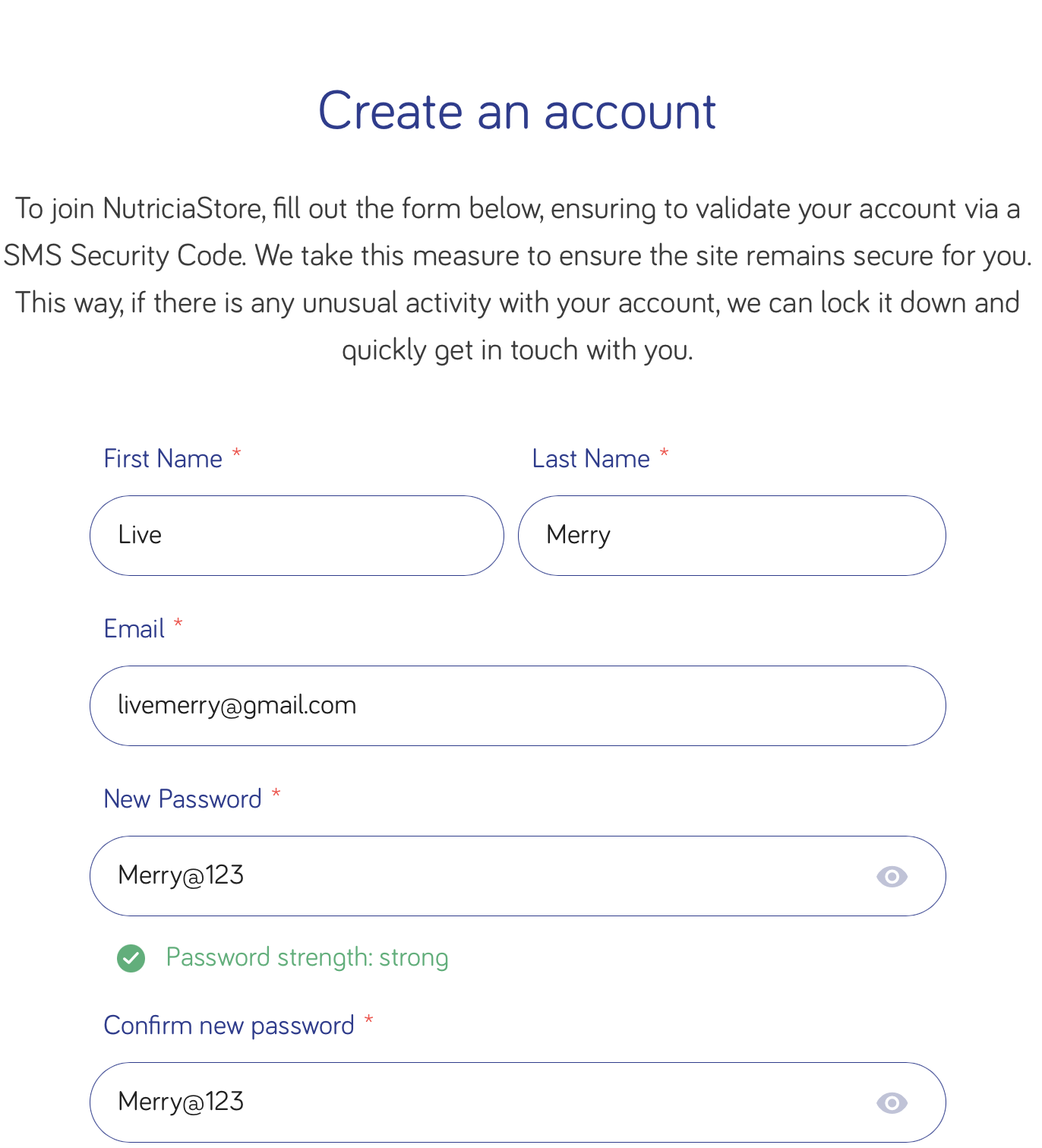
- Go to the Registration Page: Register | NutriciaStore
- Fill in your First Name and Last Name. Enter your Email address:
Please note all fields marked with a red asterix* must be filled.
- Enter a New Password then Confirm new password.
- Enter your Mobile Number with no country code or spaces between numbers.
Please note incorrect details may lead to issues with submitting your order.
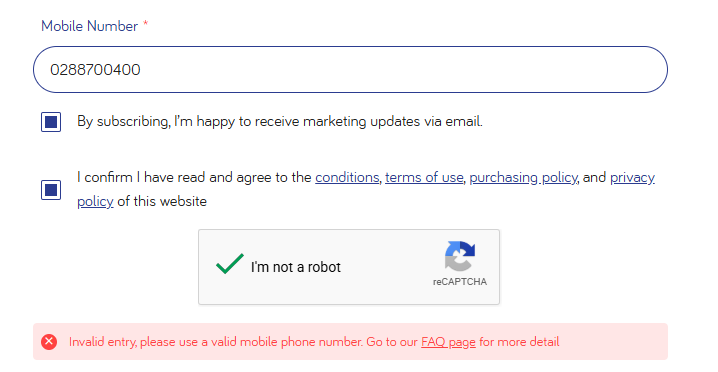
- Tick the box if you’d like to receive marketing updates via email.
- Confirm you have read and agree to the conditions, terms of use, purchasing policy and privacy policy by ticking the box.
Please note there are four different check boxes to review before finalizing your order.
- Click on I’m not a robot.
- Then click Sign up.
- Verify Your Account
- Check your email inbox for a verification email from NutriciaStore
- Click the verification link to activate your account
Ordering
How do I place an order?
- Choose the product you are after
- Choose the quantity you'd like to receive
- Click 'Proceed to checkout'
- Either register as user (to ensure easier repeat purchases) or continue as a guest. Please note: Only a valid email address with be accepted.
- Fill out the shipping form as accurately as you can.
First Name: Enter your first name
Last Name: Enter your last name
Street Number and Address: Start to type your house number and street name. A drop down validation list will appear. Continue to type until our address appears and ensure you select that address
Suburb: This should appear automatically if your street address was validated correctly; otherwise enter your suburb.
State: This should appear automatically if your street address was validated correctly; otherwise select your state from the drop down menu.
Post Code: This should appear automatically if your street address was validated correctly; otherwise enter your post code.
Email: Enter a valid email address; this will be used for communication relating to your order confirmation.
Telephone: Enter a valid mobile number; this will be used for all tracking details for your delivery. Delivery instructions: (NOT mandatory) From the drop-down options, choose the delivery instruction valid to your order.
Please note: Any errors made filling out the form could lead to issues with your delivery.
Checkboxes: There are four different checkboxes to review before finalising your order.
1. Authority to leave (NOT mandatory)
This confirms that you give Nutricia permission to leave your order at your chosen address, even if someone is not at home when the delivery is made.
2. Address Check (Mandatory)
This confirms that you have made sure the correct address is entered. If you make a mistake Nutricia may not be able to redirect your order.
3. Updates (NOT mandatory)
This allows Nutricia to email you in regards to promotions happening on the NutriciaStore.
4. Site Agreement (Mandatory)
This ensures that you have read the terms and conditions, the terms of use, our purchasing policy, and our privacy policy, before placing your order.
- Click ‘Continue’ and move onto payment methods
The above information will be treated in accordance with our Privacy Policy
How many products can I order at a time?
The minimum and maximum order limits vary among our product range to ensure ongoing availability to our customers. Please refer to the table below for details of the order limits. Nutricia may, at its discretion, make changes on order quantity limits and assert a minimum order quantity on its product range from time to time. Any changes will be communicated to you at the point of purchase.
| Product | Order Quantity Limits |
|---|---|
| Baby Formula & Toddler Milk Drinks * | 3 Units Limit Every 14 Days |
| Aptamil Profutura Infant Formula From Birth to 6 Months | 3 Units Limit Every 28 Days |
| Aptamil Profutura Follow on Formula From 6 to 12 Months | 3 Units Limit Every 28 Days |
| Karicare Goat Toddler Milk Drink - From 12 Months | 3 Units limit every 28 Days |
| All Medical Products | No Limits |
*Excluding Aptamil Profutura stages 1 & 2, and Karicare Goat Milk 3
Can I place multiple orders within 14 days? Apply to baby formula and toddler milk drinks only
You can place more than one order within 14 days as long as the total quantity ordered during this time does not exceed the 3 tin limit outlined in the order limit table.
Why do you limit the amount of products I can order?
We understand how important it is to ensure product is available to our customers and therefore enforce order limits to ensure fair and equitable supply of our products. This takes into consideration what is deemed to be a a reasonable quantity to cover the dietary/nutritional needs of our patients and consumers within the purchase period.
Can I order more cans if I have had a multiple birth?
To discuss what options may be available for our multiple birth families, please contact our Nutricia Careline on 1800 438 500 and they will be able to provide advise relating to this query.
How do I know if a product is in stock?
If the item on the website is able to be selected and added to your cart, you can be sure that we can supply you the product. In the unlikely event that a product is out of stock, it will be marked accordingly on the NutriciaStore site, and you will be unable to select it for purchase. For further information on stock availability, you can email us at nutriciastore@danone.com or call us on 1800 691 473 during normal office hours (9am-5pm) AEST.
Can I place my order by phone?
Unfortunately, no. For the security of your credit card information, we only take orders via the NutriciaStore website.
I need assistance with my order, who can I contact?
If you'd like to speak to someone about your order, you can email us at nutriciastore@danone.com or call us on 1800 691 473 during normal office hours (9am-5pm) AEST.
How do I know which product to choose?
Our Nutricia Careline team of registered dietitians, nutritionists and midwives are here to provide free product support, information and general nutritional advice for every individual patient and consumer journey. You can send your question via email nutriciacareline@danone.com or you can call them on AU: 1800 438 500. Please contact healthcare professionals if you require health advice/care.
Payment
What payment options are available?
We currently accept payment via Visa or Mastercard.
Am I able to pay via Amex or Diners Club?
Unfortunately, no. At this time, we only accept payment via Visa or Mastercard.
Am I able to pay via Paypal?
Unfortunately, no. At this time, we only accept payment via Visa or Mastercard.
How will I know if my order has been received / dispatched?
Once your order has been dispatched, you will receive a text message/email with your order tracking information
How do I know my payment is secure?
The NutriciaStore checkout process is secured by TLS (Transport Layer Security) a widely adopted security protocol designed to facilitate privacy and data security for communications over the Internet. When secured by TLS, connections between your internet browser and a website are secured and sensitive information such as credit card numbers cannot be seen by unauthorised parties. You can be sure that the website uses TLS by noting the address (the site’s address will start with https:// instead of http://) and the padlock in your browser’s address bar.
Refunds / Exchanges
We do not provide refunds or replacements due to ""change of mind"" (i.e. Incorrect product chosen, incorrect flavour chosen, etc). Please note, we offer refunds or replacements of products only if you have received:
- The wrong products to that which you ordered; or
- The incorrect quantity of products; or
- Products damaged in transit; or
- Defective or faulty products; or
- Otherwise in accordance with the law.
Please refer to Clause 8 of the Terms and Conditions of sales for full terms on claims and return requests.
Delivery
What parts of the country do you deliver to?
We deliver everywhere in Australia but if you live in a remote area it may take a little longer.
I made a mistake on my delivery address, what do I do?
Unfortunately, if your order is already in progress, we cannot change the delivery location. You may however, contact the delivery provider once you receive your tracking number and they may be able to re-route your delivery if needed. Due to the short timeframe for delivery, however, this option may not always be possible.
I want to change my delivery address, what do I do?
Unfortunately, if your order is already in progress, we cannot change the delivery location. You may, however, contact the delivery provider once your receive your tracking number and they may be able to re-route your delivery if needed. Due to the short timeframe for delivery however, this option may not always be possible.
What delivery charges apply?
If your order is over $50 in one transaction, you will not be charged a freight fee. Any order below this amount of $50, a nominal freight charge will apply per the details outlined in your order.
Do you ship outside Australia?
No. Products purchased on this website will only be delivered to local customers in Australia.
How long will my order take to arrive?
Orders ship from our warehouse in Sydney via standard delivery. This can take up to 5 working days for Eastern states of Australia, areas outside of this typically arrive within 8 working days. We’ll email or send you a text with your parcel tracking details when your order is on it’s way.
| Estimated Metro Delivery Timeframes | |
|---|---|
| Sydney / Canberra | Up to 4 days |
| Melbourne / Brisbane | Up to 5 days |
| Adelaide | Up to 6 days |
| Perth / Tasmania | Up to 7 days |
| Darwin | Up to 8 days |
| Note: Please add up to an additional 3 days for regional | |
How can I know the delivery status of my order?

The best way to track and manage your deliveries is with the Australia Post mobile app.
Do you have an express delivery option for faster delivery?
Unfortunately, no. We are not able to offer that delivery option.
What if I'm not home when my order arrives?
The best way to ensure successful delivery is to provide the address that you frequent during the day. If you’re not home during the day, you can provide a work address for delivery. You can also authorise to leave the items unattended. Please note if you opt to leave the order unattended, Nutricia will not be responsible for any lost or stolen packages.
General
Who operates the NutriciaStore?
NutriciaStore is operated by Nutricia Australia Pty Limited. The NutriciaStore is an online ordering site where you can purchase Aptamil and Karicare products in one location 24x7, making it easier for parents and carers to purchase our products and have it delivered to your door.
Why do you advertise “Breast Milk Benefits” on your website?
Our Baby Formula Marketing Standards not only represent our company’s fundamentals but also acknowledge scientific insights and the importance of the World Health Organization’s International Code of Marketing of Breast-Milk Substitutes (1981) and the subsequent relevant resolutions of the World Health Assembly which emphasizes the nutritional benefits of exclusive breastfeeding for the first six months of life, followed by continued breastfeeding up to two years and beyond, alongside the introduction of safe and appropriate Complementary Foods after six months of age. To find out more, refer to our Danone Baby Formula Marketing Standards policy

We’re also members of the Infant Nutrition Council, an industry body committed to supporting breastfeeding and, when appropriate, infant formula.
Troubleshooting
Occasionally the website may not be able to process your order and an error message may appear. If this occurs, please note the error message and contact the NutriciaStore team via the following methods:
Occasionally the website may not be able to process your order and an error message may appear. This often happens if your order is not in compliance with our purchasing terms and conditions.
If this occurs, please check the following details on your order:
- valid address details have been provided
- valid credit card details have been provided
- check that the order does not exceed the limits outlined in our purchasing policy
- ensure multiple accounts are not being used with similar account details.
If you still have concerns, note the error message and contact the NutriciaStore team via the following methods:
Phone: 1800 691 473 within normal office hours (AEST) or email at nutriciastore@danone.com for assistance.
I received the following error, what does this mean? " You are over our maximum quantity of 3 tins every 14 days."
This means that a purchase has been made using your details in the past 14 days and the maximum purchase limit has been reached. You will need to wait until after the 14th day to place a new order.
Can’t find what you were looking for? Get in touch
Promo Code
If your promo code won’t apply or you get an error message, check whether the following applies to you:
- You’ve already used the code. Our promo codes can only be used once, so if you’ve ever used the code in the past then it won’t work again.
- The code has been entered incorrectly. The codes are case sensitive so enter it exactly as it is written and try again.
- The code has not met the conditions of use and cannot be used for this purchase. Your purchase may be below the minimum amount, or the code you applied is not valid for the products in your cart.
- The code has expired. Check the expiry date of the code, as some of them run for a limited time or expire after a set period.
- One or some items aren't eligible. Check the terms and conditions of the code, and make sure the items in your shopping cart aren't excluded items. Remove those products from your cart to proceed.
Promo code is not permitted by Danone’s Policy for the Marketing of Breast Milk Substitutes and other Agreements and Codes that we are part of in Australia and New Zealand. These do not allow discounts on infant or follow-on formula (Stage 1 or 2).
If you have checked all the above and are still having issues with the code, we'll need to see a screenshot of your shopping cart that shows the promo code and all items in your cart. Please contact NutriciaStore Customer Service team at nutriciastore@danone.com for further assistance with the screenshot attached to your enquiry.
Souvenaid Subscriptions
What is a Souvenaid® subscription?
A subscription means Souvenaid® is delivered to your home automatically.
You choose how often it arrives (for example, every 3, 4 or 6 weeks).
You don’t need to remember to order each time — it simply comes when you need it. If plans change, you can pause or stop your subscription at any time.
Why would I choose a subscription?
Many people choose a subscription because it is:
- Automatic recurring deliveries
- Exclusive subscription pricing
- Flexible delivery schedule
- Easy account management
- Pause, skip or cancel your subscription at anytime
How do I start a subscription?
You must have an active email address to use the subscription service.
- Go to NutriciaStore (where you usually order Souvenaid®).
- Choose the Souvenaid® product you want.
- Select the “Subscribe and Save” option.
- Choose how often you want it delivered (e.g. every 3 weeks, 4 weeks)
- Add to cart and check out.
Why is an email address required?
An email address is needed so we can send you important updates about your subscription—like reminders before your next delivery and when your next payment is due. This gives you time to pause, change, or cancel your subscription if you need to. Without an email address, these important details would be missed.
Can I still buy Souvenaid® one order at a time?
Yes. You can still buy Souvenaid® whenever you like.
Subscriptions are simply another option if you want things to be easier and more predictable.
Can I pause, change, or cancel my subscription?
Yes- You can:
- Manage Subscriptions
- Pause your deliveries
- Change how often Souvenaid® is delivere
- Cancel your subscription at any time
There are no lock‑in contracts.
To manage your subscription
- Click on the account section from the top right:
.jpeg)
- Go to my subscriptions, click to manage subscription
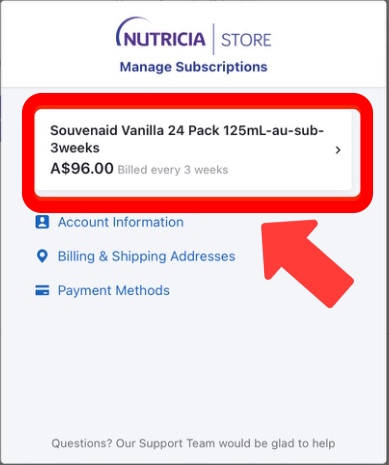
- If you are already subscribed to receive Souvenaid® products, then the screen shown above will appear. By clicking on your current subscription plan, you will be taken to the detailed page, where you can edit, pause, or cancel your subscription.
To edit your subscription
The screen will look like the image below:
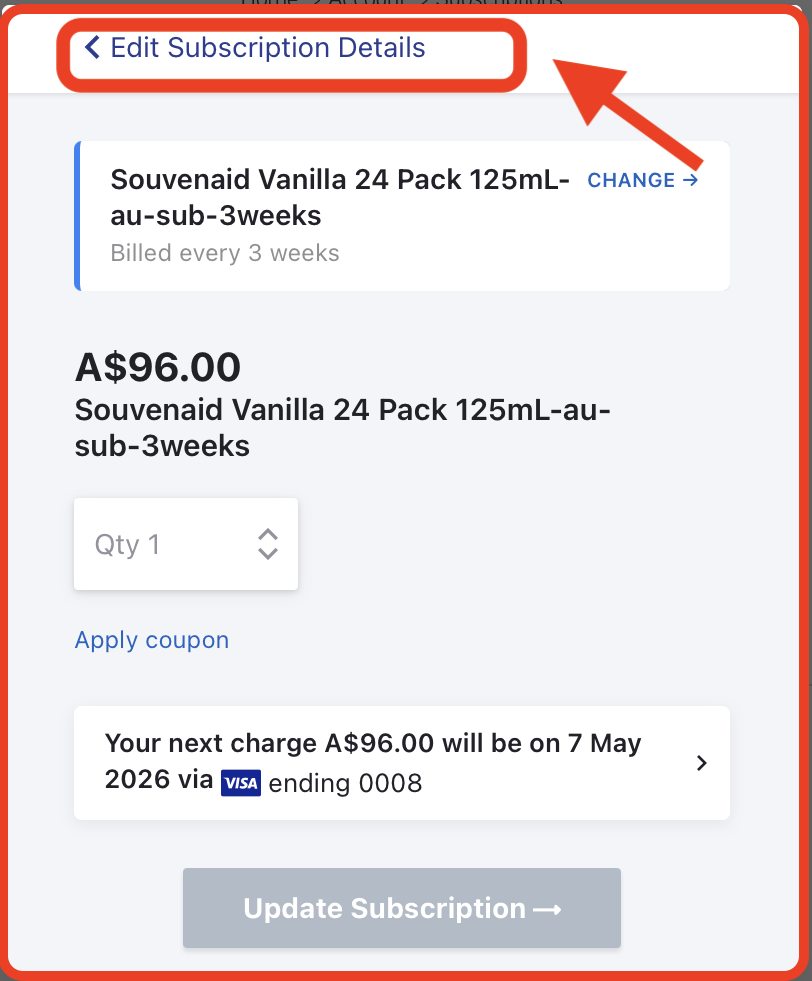
- After clicking on edit subscription, you will be redirected to the detailed page of the subscription, where you can edit and update your subscription cycle.
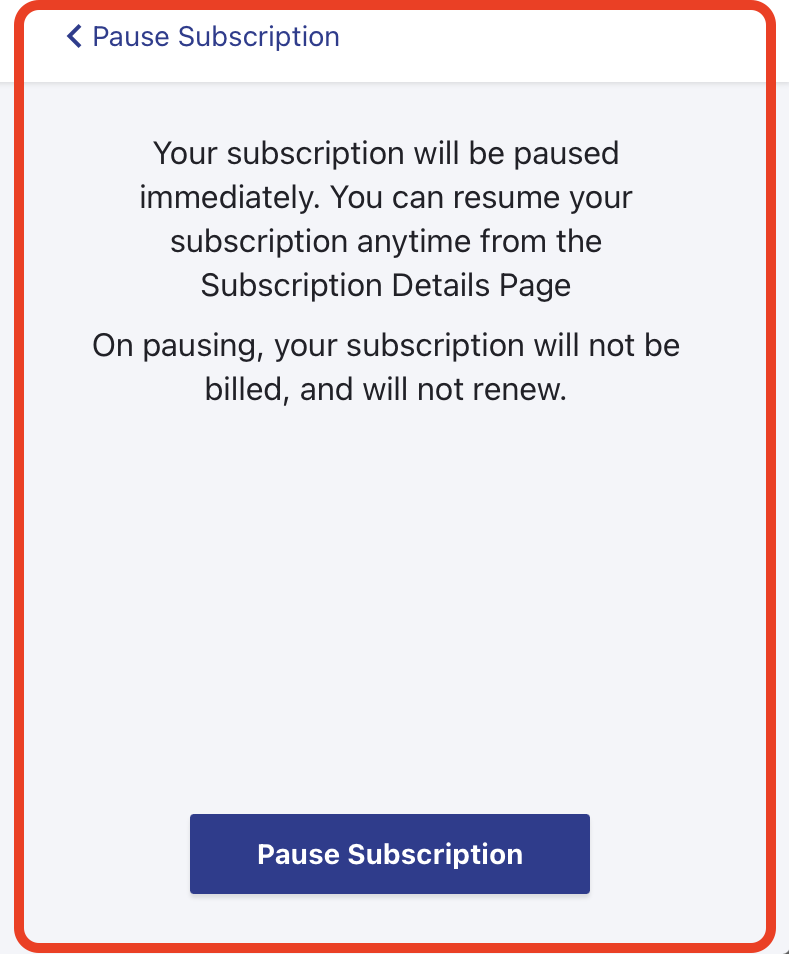
To pause your subscription
The screen will look like the image below:
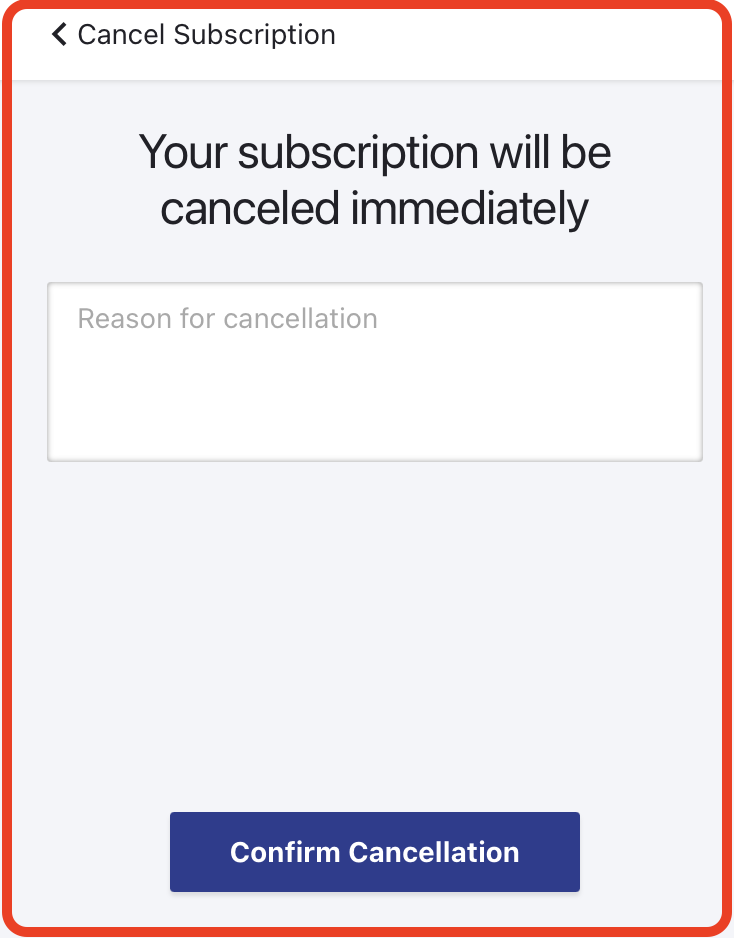
To cancel your subscription
The screen will look like the image below:
What if I ordered by mistake or I have too much Souvenaid®?
That’s okay. You can pause your next delivery or move it to a later date.
What happens if my payment details change?
If your card expires or changes, NutriciaStore will let you know via email. Your subscription won’t be cancelled straight away — you will simply be asked via email to update your details before your next delivery.
Yes, when a customer’s payment details require updating (for example, if a card has expired or a payment authentication is needed), NutriciaStore will communicate this via email to the customer’s registered email address.These emails are sent from the official NutriciaStore subscription email address and are part of the standard subscription communication process to ensure continuity of service before the next scheduled delivery.
How customers can recognise a legitimate NutriciaStore email?
The examples below illustrate the standard format and characteristics of legitimate communications:
Your Payment is due
.png)
Update your payment method details
.png)
Authenticate your payment
.png)
1. Verified sender details
- Emails are sent from NutriciaStore Subscriptions using an official email address (e.g. noreply-subscriptions@nutriciastore… as shown in the examples).
- Customers should always check the full sender address for accuracy.
- Consistent NutriciaStore branding
- All legitimate emails include the official Nutricia Store logo, formatting, and layout, consistent across communications.
2. Purpose-specific messaging: The content clearly explains the reason for communication, such as:
- Pending payment
- 3D Secure authentication
- Request to update payment method
3. Official contact details
- Customers are provided with a verified contact email (e.g. nutriciastore@danone.com) for queries or confirmation.
4. Secure action links with validity
- Links provided are secure and time-bound (e.g. valid for 5 days), directing customers to complete actions safely.
How Nutricia protects customers from fraud
To minimise risk and protect customers:
- Customers are not asked to share sensitive information directly via email. All updates are completed through secure links or their account portal.
- Communication is only sent to the registered email address used to set up the subscription, which is required for service updates and notifications.
- Emails include consistent formatting, legal disclaimers, and company details to reinforce authenticity.
- Customers are encouraged to contact Customer Care directly if they are unsure about any communication.
Updating Payment details
- Click on the account section from the top right, as per the image below:
- Under my subscriptions, select manage subscriptions
- After selecting manage subscriptions, click the third option Payment methods
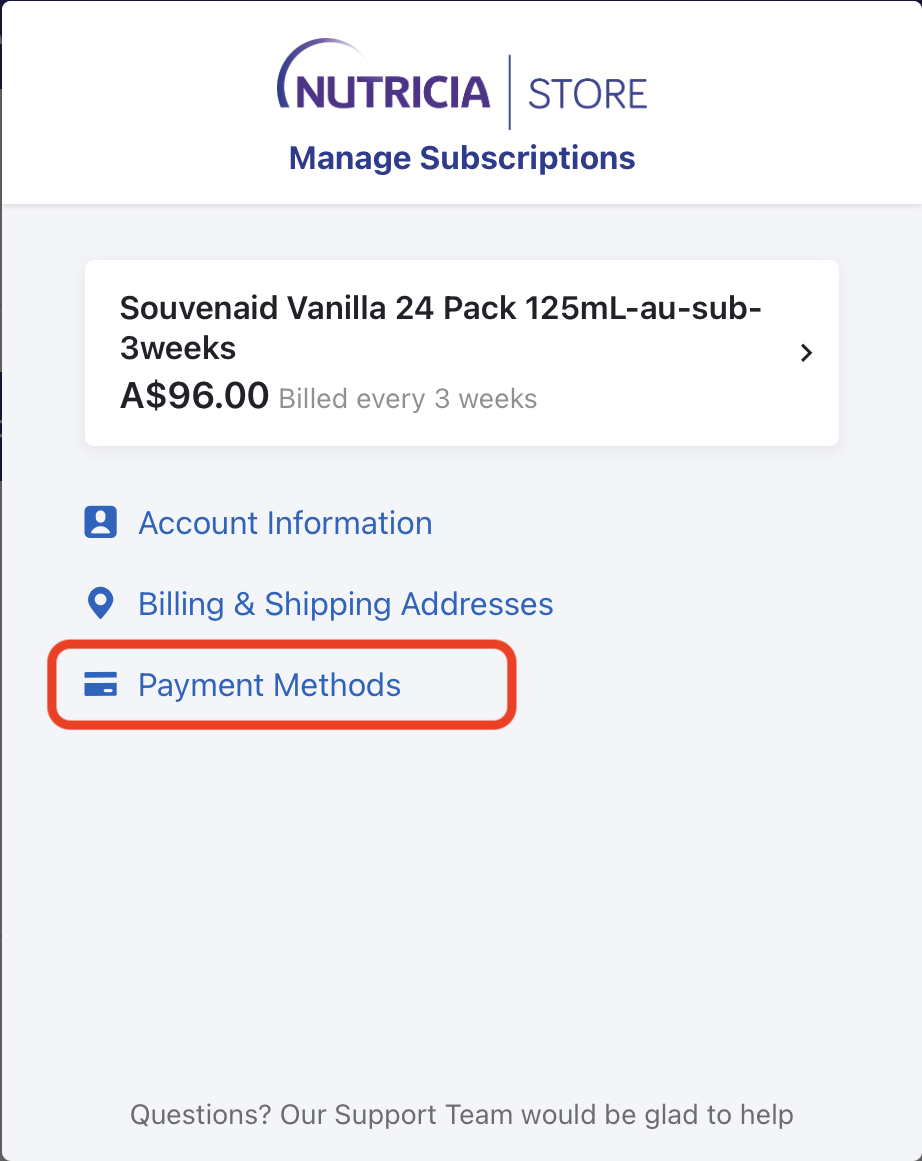
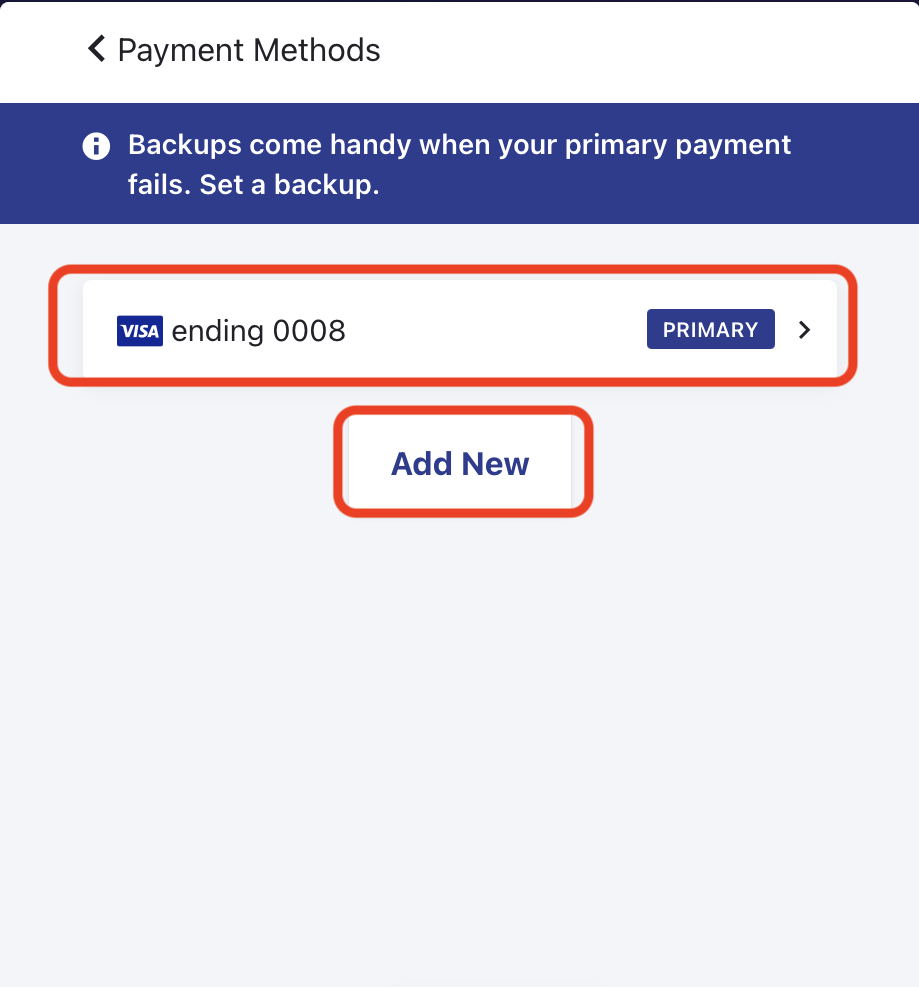
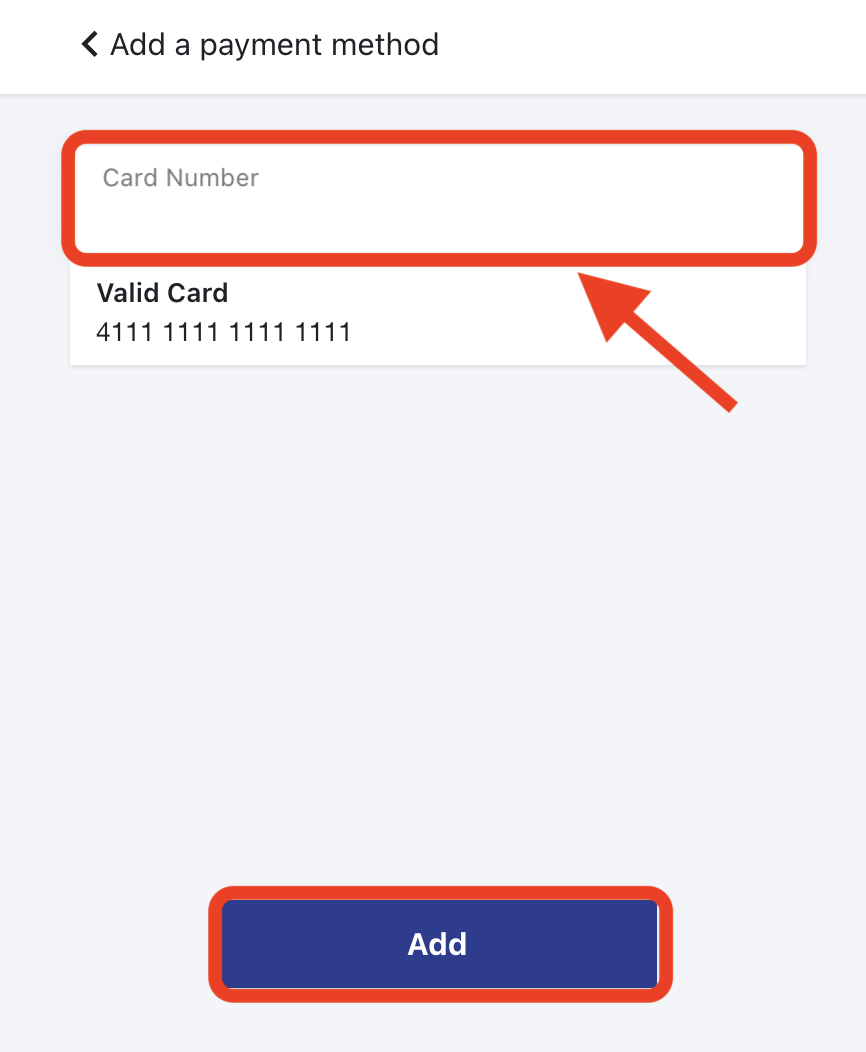
- Under Payment Methods, if a primary payment method has already been defined, the corresponding card details will be displayed. Should you wish to add an additional card, you may do so easily by clicking on ADD NEW button.